Your parents
The people scammers target most, and the least likely to spot a polished pitch. Set it up together, with their say-so. Afterwards either of you can look up any call and why it was handled the way it was.
New: iPhone app on the App StoreAndroid test open
Forward a phone to PhoneShield and it answers the calls nobody should have to. Numbers already reported as scams are turned away before the phone rings. Family and favorites ring straight through.

Nora, the front desk: Hi, you've reached Helen's line. This is Nora at the front desk. Who's calling, and what's it about?
Caller, unknown number: Yeah, hi! This is James from the underwriting department. Helen's five-thousand-dollar approval expires today.
Nora: Thank you. Helen won't be taking this call. Goodbye. (Loan scam turned away. Helen's phone never rang.)
Three more unknown callers: a car warranty pitch, someone claiming to be the IRS, and "Grandma? It's me!" All turned away.
Anna, her daughter, a favorite, rings straight through: Hi Mom! It's me. Helen: Oh, hi sweetheart! I was just thinking about you.
PhoneShield answers the calls nobody should have to.
A scammer and a daughter call the same phone, and only one gets through. Four minutes on what PhoneShield does with each call, and why your parent keeps their number, their phone and their habits.
The people scammers target most, and the least likely to spot a polished pitch. Set it up together, with their say-so. Afterwards either of you can look up any call and why it was handled the way it was.
Your time is valuable. Strangers explain themselves to the front desk first, and the calls that matter ring straight through.
One plan for the family’s phones. Each person keeps their own number, app and call history, and each further line is less.
Caregivers, fiduciaries, trustees and senior living teams protect the people whose safety and savings they answer for.
Find out who’s calling and why before deciding what needs your attention.
Keep messages and conversation transcripts together, ready when you have a moment.
Give your assistant a greeting, a personality, and the details callers need to know.
Open, Do not disturb, or Receptionist: you choose whether callers ring you, meet Nora, or leave a message.
Your own block list plus a shared list built from confirmed scam verdicts, customer reports and FTC complaints, refused before answer, with the reason shown in history.
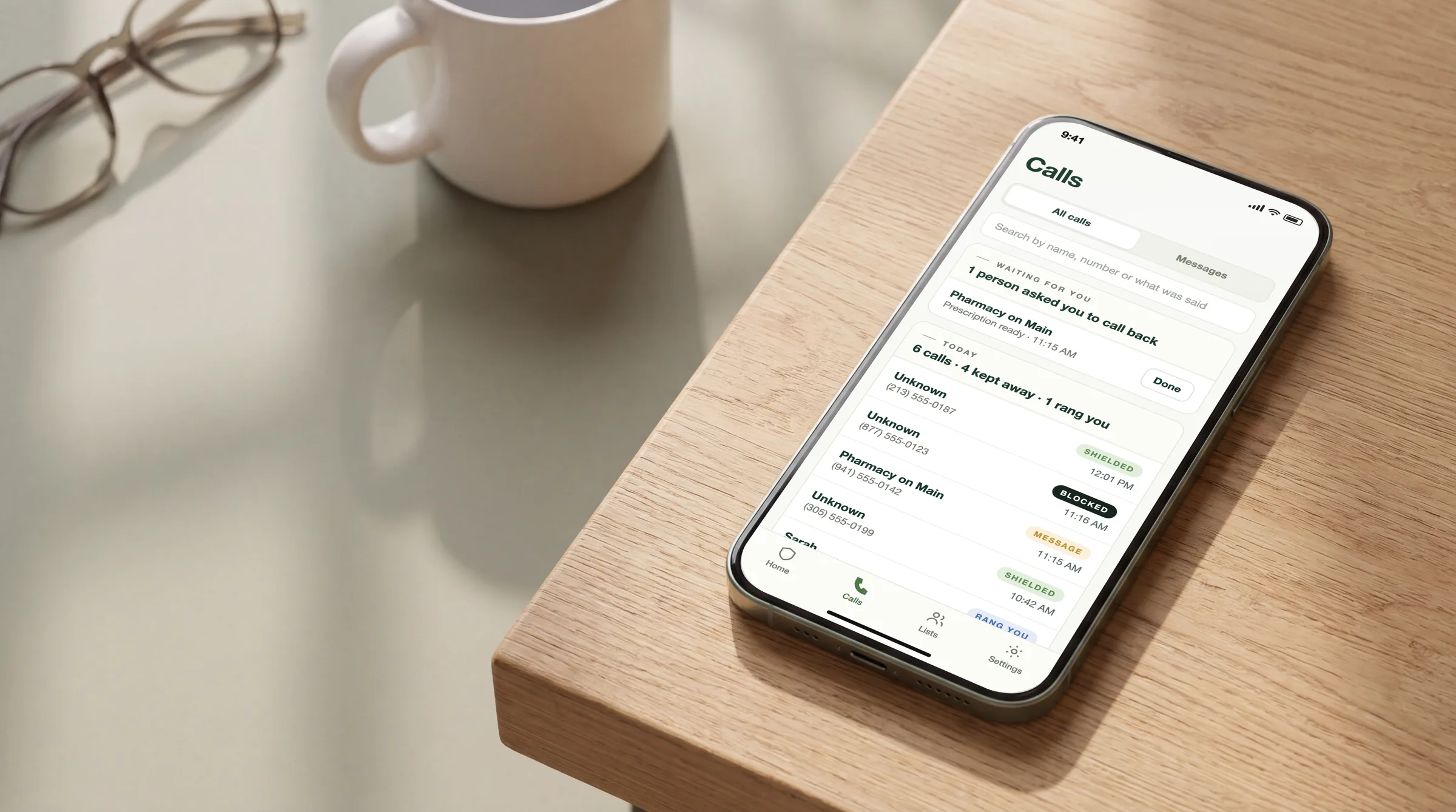
Review calls, manage your numbers, and adjust your assistant without jumping between tools. Every call shows Blocked, Shielded, Rang you, Message or Assistant, and the reason.
Choose PhoneShield as your iPhone’s text filter and texts from numbers you don’t know are sorted the moment they arrive, with the same judgment that screens your calls. It is part of your plan, in the PhoneShield iPhone app. Android is next.
Fake delivery, toll and bank texts, prize and job bait. They arrive without a buzz or a banner.
Campaign texts, and out-of-the-blue “hey, I missed you” openers, a common first step in romance and investment scams.
One-time codes, appointments and deliveries go to Transactions. A login code is never put in Spam.
Texts from your contacts never reach us. The rest are checked as they arrive and not kept: no texts, no senders.
Subscribe and we assign a PhoneShield number. Forward the phone to it with one carrier code. Nobody they know has to learn anything new.
Numbers on the shared scam list and in the FTC’s daily complaint data are refused before the phone rings. Family and favorites ring straight through. Everyone else answers one question at the front desk.
A caller with a real reason rings the PhoneShield app like any phone call, with their name on the screen. Questions go to Nora, the assistant. Sales pitches and scam scripts are declined. Each call is listed in the app with what happened and why.
Put the PhoneShield app on the iPhone, then tell the iPhone to forward to PhoneShield. Calls that pass ring the app like any other call. Captions are burned in, so it plays fine on mute.
Fifty billion robocalls a year, most of them from call centers that paid a hundred dollars for a fake caller ID. Carrier labels catch the old numbers; the newest ones ring anyway. PhoneShield puts a front desk between the caller and the person you love.
Numbers already reported as scams are refused before the phone rings. Family rings straight through. Everyone else explains themselves to the front desk. A scam verdict blocks that number on your line at once, and on every PhoneShield line when a second line, a known scam script or FTC complaints confirm it. Your parent keeps their number, their phone and their habits, and the call history shows how each call was handled and why.
Repeated complaints in the FTC's daily Do Not Call data block a number too, and every scam we decline comes with a complaint ready to file.
Strangers tell the front desk who they are first. The doctor’s office gets through; the warranty pitch does not.
A new client reaches you or leaves a real message while you are busy. Sales pitches and scam calls do not ring your phone.
Every caller gets a polite answer, even when you are with a customer, and impersonation calls aimed at small businesses meet the same screening.
$29.99 a month covers one line: your PhoneShield number, scam calls refused before they ring, a front desk that screens everyone else, messages, calls that ring you, and 150 minutes a month of Nora, the assistant. There is no monthly minimum and no per-minute charge for screening.
Only Nora’s talk time. The first 150 assistant minutes each month are included; after that, each minute is $0.12. Scam refusals, front-desk screening, messages and calls that ring you are unlimited and not metered. Once Nora connects a caller to you, the rest of that call is not metered either. At 300 assistant minutes you pay $47.99; at 900, $119.99.
Prices are in USD before taxes. International and toll-free calls, extra numbers, SMS, custom tools, premium model upgrades and custom integrations are outside the plan and need a separate quote. Your current carrier may charge for forwarding.
Yes. Each further line is $19.99 a month ($199 a year on a yearly plan) on the same bill. From your Billing page, send an invite by email; they accept with their own account and get their own PhoneShield number, call history and app sign-in, each with 150 Nora minutes a month. Remove a line any time; billing is prorated.
Yes. Keep your current number and forward it to your PhoneShield number. Vetted calls then ring you in the PhoneShield iPhone app, like any phone call. No second line, no new SIM. Without an iPhone, they can ring a second number you choose instead.
No trial, no tiers, no contract. One plan, monthly or yearly (two months free), plus a lower price for each further line: you subscribe, we assign your number, and you can cancel any time from the billing page. The setup checks itself: a test call confirms forwarding works before you rely on it.
Calendar booking and a human backup team are not included. Notifications by Telegram, email, Slack or webhook are, and Nora can connect a caller to you. Tell us which workflows you need so we can assess them before you commit.
Set up a receptionist that works your way.